
A Practical Guide for Operations and Customer Experience (CX) Teams
When a rider looks at a service alert, they have one question: Should I change my trip?
Transit agencies often frame alerts around operational events, such as a late bus, an unavailable vehicle, a service gap, a detour, or a closed station. But inconsistent terminology, mismatches between alert language and structured service data, and the overuse of alerts make it difficult for riders to understand what’s happening and what it means for their trip. Without a consistent, rider-centered strategy for communicating service changes, alerts can create confusion instead of clarity or become background noise.
The goal of an alert isn’t to share everything the control center knows, it is to give riders the information they need to decide whether to wait, walk, or change their journey.
This guide applies to both planned and unplanned disruptions. Inside an agency, those are often handled by different teams on different timelines. But riders don’t experience that distinction. A disruption shows up in the same app, the same push notification, and the same digital sign either way, and riders need the same answers. What follows are the practices we suggest for making those answers consistent, whoever is writing them and however much notice they had.
If You Only Do One Thing This Week...
If you are leading an operations or customer experience team, you do not need to overhaul your entire alert software ecosystem overnight to make an immediate impact. Start with these three quick actions:
- Audit your top five most-used alert headers. Pull your logs from last month. Check if your most common alerts lead with the route and effect, and whether they would survive a mobile push-notification cutoff.
- Ban internal jargon on public channels. Replace words like bustitution, single-tracking, or diversion with plain-language equivalents (shuttle buses, slower trains, detour) across your team's templates.
- Commit to clock times. Replace vague durations ("for 45 minutes") with explicit estimates or next-update commitments ("until about 6:00 PM" or "next update by 4:15 PM").
Once your team masters these three habits, you can build out the full decision trees, style guide, and playbook detailed below.
Keep this guide at your desk. The one-page checklist covers the alert header pattern, plain-language terms, and the checks to run before every alert goes out. Print it or share it with your alert writers.
Operations vs. Rider Comparison
Most alert problems start with a mismatch in perspective: The operations in the control room sees the system and a rider on a platform sees one trip.
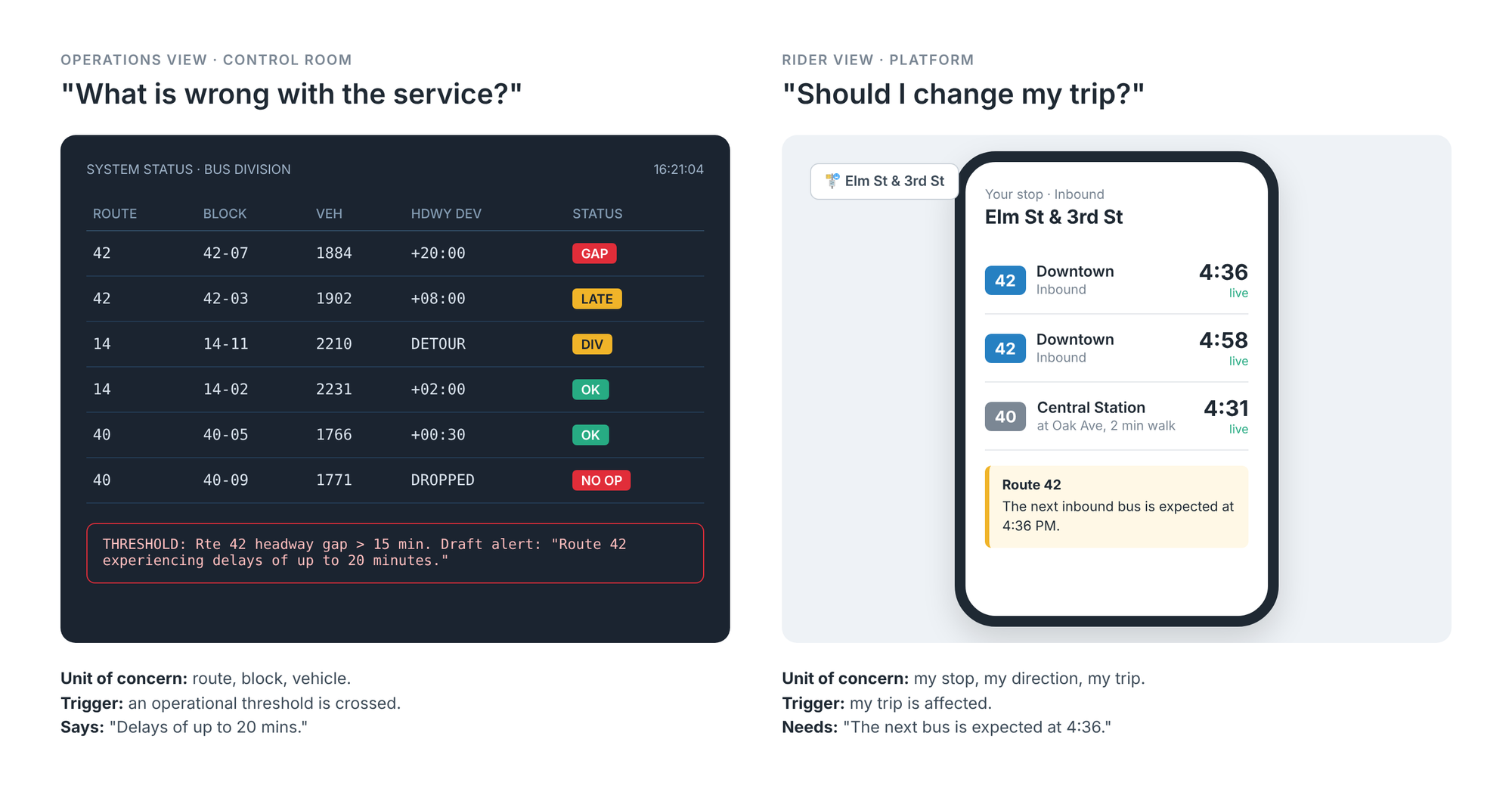
| Dimension | Operations View (Control Room) | Rider View (Platform) |
|---|---|---|
| Starting question | What is wrong with the service? | Should I change my trip? |
| Unit of concern | Route, block, vehicle | My stop, my direction, my trip |
| Trigger | An operational threshold is crossed | My trip is affected |
| How the problem is described | “Delays of up to 20 mins” | “The next bus is expected at 4:36” |
| Vocabulary | Bus bridge, single tracking, diversion, dropped trip | Shuttle bus, slower trains, detour, canceled trip |
How Operations Language Shows Up in Alerts
When alerts are written live, under pressure, by the people closest to the incident, the control room’s view leaks into the copy. Common signs:
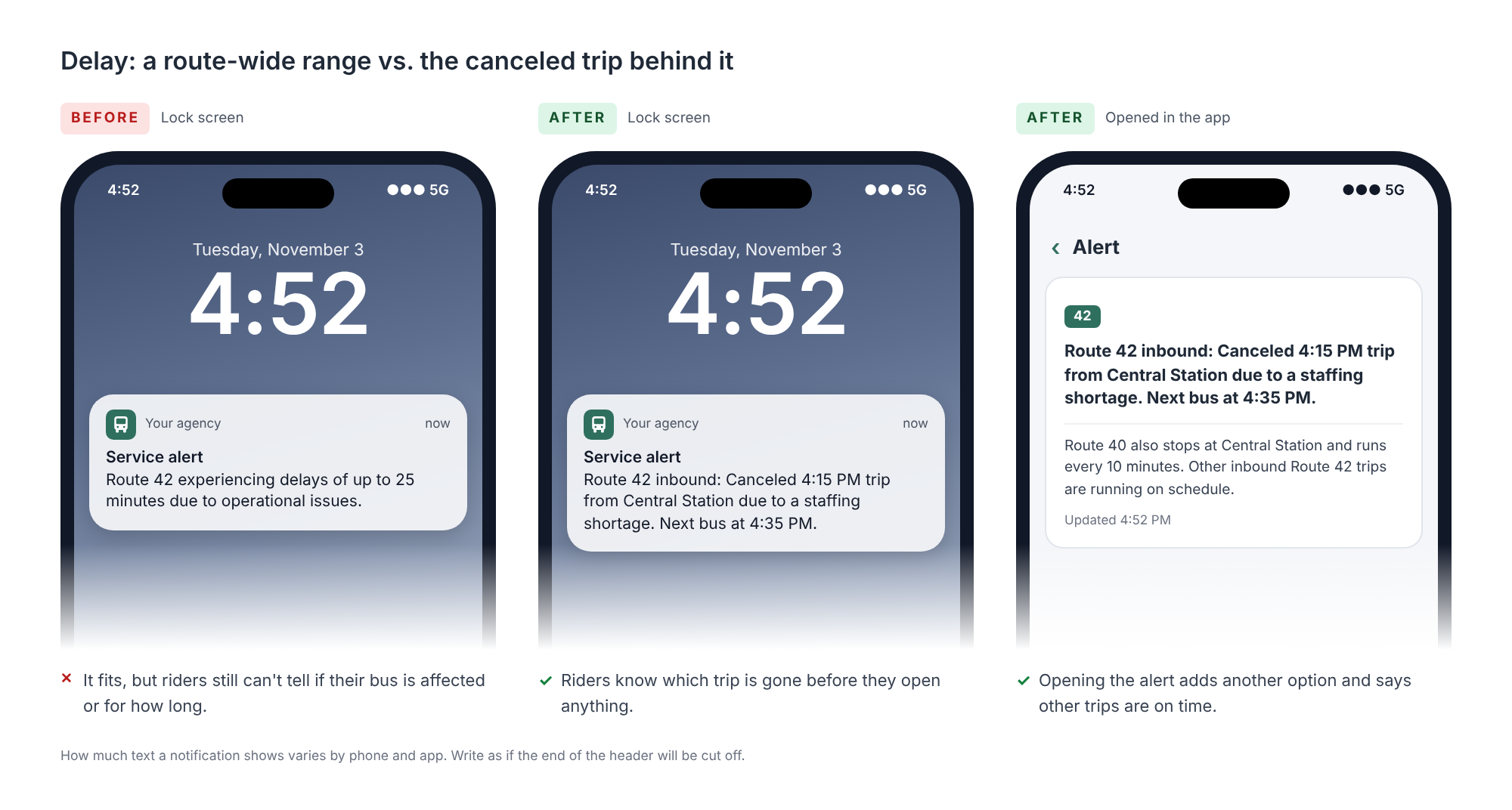
- Route-wide ranges instead of trip-level facts. “Delays of up to 25 minutes” leaves riders unsure whether that means their bus, every bus, or the worst case.
- Internal terms. “Bus bridge,” “short turn,” and “express to” make sense on the radio. Riders have to guess what they mean for them.
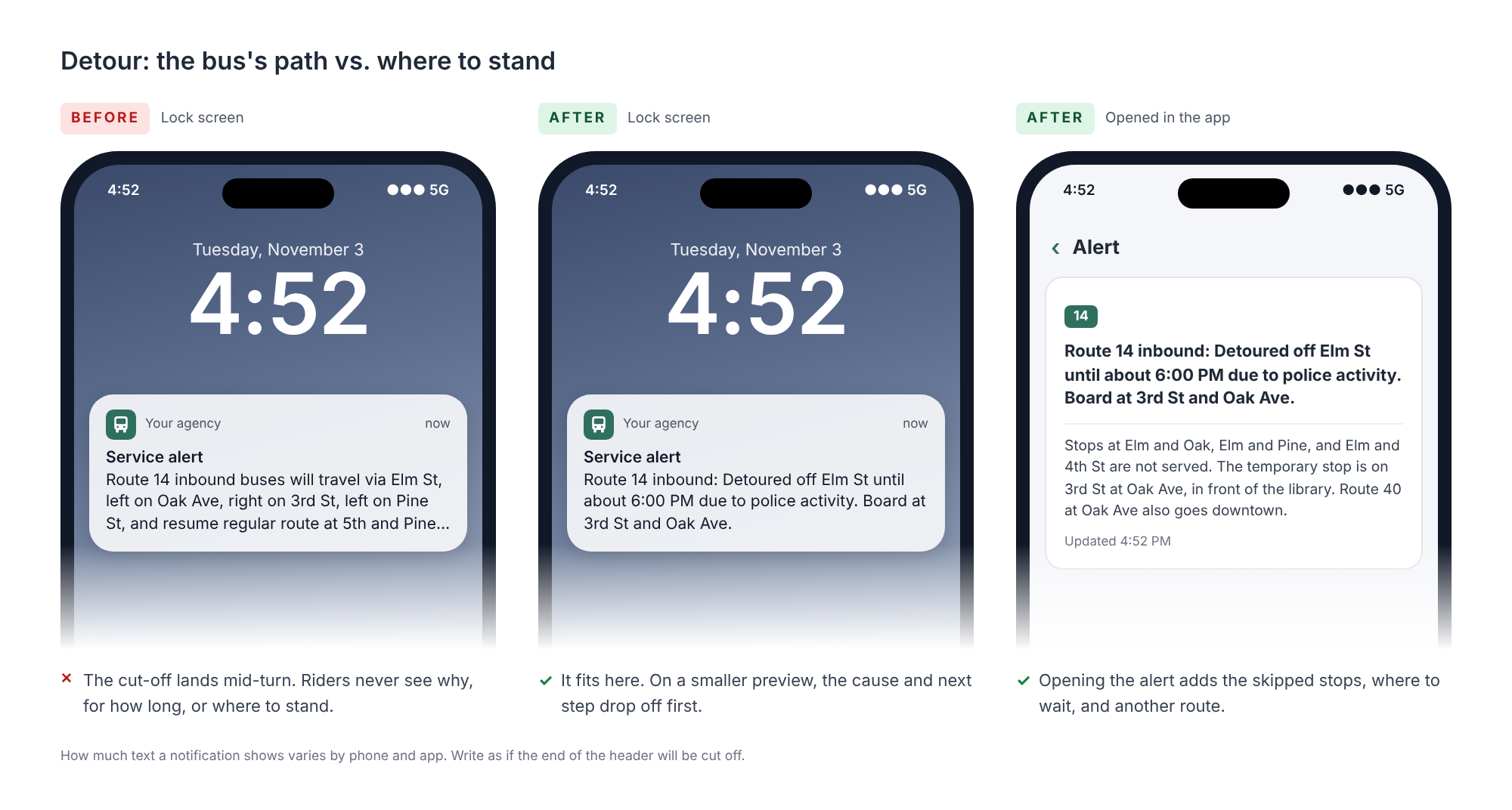
- Turn-by-turn routing. A detour written as a list of street turns describes the bus’s path. Riders need to know where to stand.
- Missing or vague causes. “Due to an operational issue” tells riders nothing and can be read as evasive.
What Riders Need From an Alert
Across my research, riders looked for the same four answers, in roughly this order:
- Is my trip affected? (route, direction, stops)
- What should I do? (wait, walk to a different stop, take another route)
- When will it be over? (a clock time, or when the next update is coming)
- Why is this happening? (a plain-language cause, which also tells riders how serious it is)
I suggest teams use this view as the lens for everything that follows. Map your own alerts through it, then use what you find to build your templates, style guide, decision trees, and a playbook.
Planned vs. Unplanned Disruptions = Different Timelines, Same Expectation
Planned and unplanned disruptions follow different operating processes. CX teams may spend weeks preparing communications for planned disruptions, while control rooms must respond to unplanned events in minutes. The principles in this guide apply to both, but the time available for writing and review, and the role the alert needs to play in helping riders respond, will differ.
- Planned disruptions come with many channels. There is time for diversion pages, printed signage, media outreach, staff on the ground, and structured data published well ahead of the change. The alert is one piece of a larger communication plan.
- Unplanned disruptions often have no one on the ground. When a collision closes Main Street, there is no poster and no ambassador at the stop. The alert, and whatever structured data you can publish with it, is often the only thing the rider gets. That is why unplanned alerts deserve special attention since a good one helps many riders quickly, and a confusing one sends them in the wrong direction.
Riders understand this difference in that they don’t expect a polished map for an incident that happened ten minutes ago. But they do expect to hear about it promptly and in words they can act on. A timely, clear alert that gets more detailed if the disruption continues is better than a perfect one that arrives after the bus has already gone.
Using Structured Data to Free Up Your Alerts
Before deciding what an alert should say, ask whether this needs to be an alert at all. In the ideal case, structured real-time data (GTFS Realtime) carries most of the information. It flows into trip planners, countdown signs, and apps automatically, so riders see updated times and paths wherever they look. The alert then does what data can’t by explaining what is happening, why it is happening, and guiding riders through it.
| What Changed | What the Rider Needs to See | Where It Should Come From |
|---|---|---|
| Bus is running 8 minutes late | Updated arrival time | Real-time trip data |
| A trip is canceled | That specific departure is canceled | Real-time trip data, plus an alert if riders need options |
| Bus will skip a stop | The stop is skipped | Real-time trip data |
| Bus is detoured | Updated path, stops, and times | Real-time detour data, plus an alert for context |
| Shuttle buses replace service | Shuttle times and where to board | Shuttle schedules in trip data, plus an alert |
| Stop is temporarily moved | Where to go instead and why | Updated stop data, plus an alert |
| Major disruption affects many trips | What happened and what to do | An alert tied to the affected service |
When the Data Can’t Keep Up
In practice, structured data often can’t do all of this, especially during unplanned disruptions:
- Timing: By the time a reroute for a broken water main is entered into detour data, the street may already be open again.
- Partial support: Not every agency publishes every part of the specification, and not every rider app displays every part it receives.
- Tool constraints: Many alert tools, especially at smaller agencies, offer limited fields. Some don’t let staff set an effect or name affected stops at all. (Note: If your tool’s options don’t clearly match what riders see in apps, ask your vendor how each field appears in your published feed.)
When data can’t carry the weight, alerts tend to try to do too much to make up for it and that is where alert consistency matters most.
Building Your Playbook Before the Next Incident
Imagine walking into an airport where every airline posts its own departure board. One shows departure times. Another shows a countdown. A third lists flights by destination instead of time. Some say “boarding,” others “now loading.” You could probably find your gate, but you would have to decode each board first.
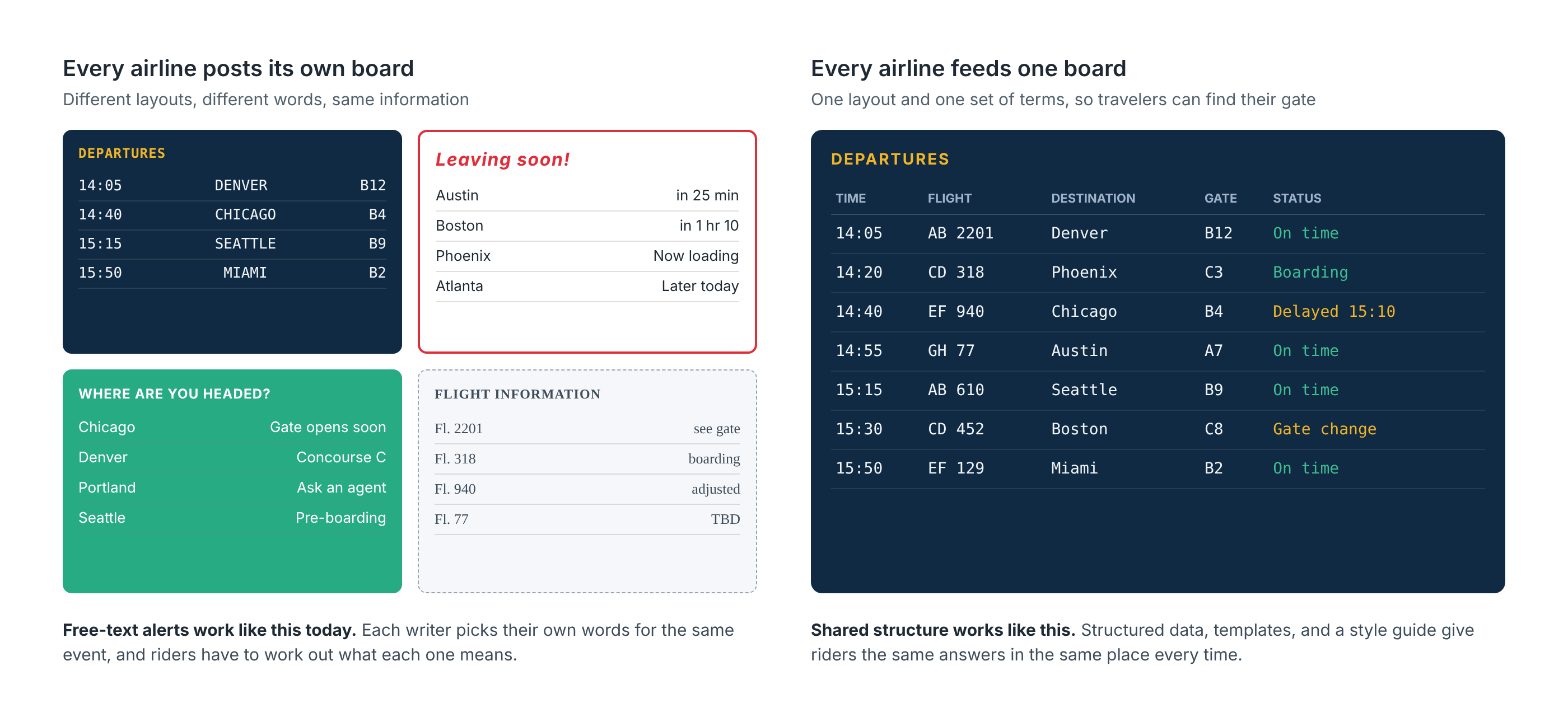
Riders experience something similar to this when alerts are written in free text without agency guidelines. Each writer brings their own interpretation of what is happening and their own words for it. One dispatcher calls it a detour, another says the stop moved, a third describes the bus’s new path. Operationally, it is the same event. To the rider, it reads like three different situations, and they have to work out what each one means.
Airports solved this by having every airline feed the same data into one board. Structured data can do the same for transit, and I encourage agencies to use it as much as their tools allow. Until it is available everywhere, the structure has to come from the people publishing alerts. That means deciding in advance, so that dispatchers aren’t making wording and judgment calls live during an incident.
I suggest four tools, ideally developed by operations and CX together:
- Decision trees that sort a disruption into a defined type based on what is happening on the ground.
- A content style guide that names each type of disruption one way, every time.
- Templates that turn the answers into a consistent alert.
- A playbook that assigns who writes, updates, and removes alerts.
Decision Tree: Detours and Stop Moves
A short decision tree removes the most common judgment calls. For example, when a bus can’t follow its usual path:
- Does the bus still serve every scheduled stop? If yes, it is not a rider-facing detour. Skip the alert unless the delay is large enough to warrant a simple delay notice.
- Is a single stop skipped? Name the skipped stop and its replacement in the header so riders see the alternative right away.
- Are several stops skipped? Summarize the affected street or area in the header (for example, “Market Street stops downtown not served”) and list each skipped stop and its replacement in the description.
- Is the stop itself closed, or relocated nearby for every trip? Call it a moved stop, not a detour, and say exactly where to wait.
The criteria matter less than having them written down, shared, and applied the same way by everyone.
Style Guide: One Term per Situation
Pick one plain-language term for each type of disruption and use it everywhere. Here is a starting point:
| Instead of | Say |
|---|---|
| Bus bridge, bustitution → | Shuttle buses replace trains |
| Diversion, re-route → | Detour |
| Dropped, missed trip, not operating → | Canceled |
| Stop relocated, temporary stop location → | Stop moved |
| Suspended, service disruption → | No service |
| Reduced frequency, single tracking → | Trains are running less often |
Template: The Anatomy of an Alert
A template works like a fill-in-the-blank: the writer supplies the facts, and the template supplies the order and the wording. Each blank answers a rider question and has a set place in the alert.
The header is what everyone sees in push notifications, text messages, and app previews. How much of a header riders see depends on the device, the app, and the channel. There is no reliable character limit to write to, so assume the header will be cut off and put the most important details first. Lead with the route and effect, then scope and end time. Add the cause and the rider’s next step after that, when they fit in a few words. If they get cut off, the rider still has what they need to decide whether their trip is affected.
| Building Block | Rider Question | Where It Goes | Example | Feed Field |
|---|---|---|---|---|
| Route | Is my line affected? | Header | Route 42 | Affected service |
| Effect | What kind of change is this? | Header | Detoured, No service, Shuttle buses | Effect |
| Scope | Which direction or stretch? | Header | Inbound, between Elm St and 5th St | Affected service |
| End Time | When will this be over? | Header | Route 42 | Affected service |
| Cause | Why is this happening? | Header if short, otherwise description | Due to police activity | Cause, plus text |
| Alternative | What should I do instead? | Header if short, otherwise description | Take Route 40 at Oak Ave | Text |
| Skipped stops | Is my stop affected? | Descripton (header if only one) | Stops at Elm, Oak, and Pine not served | Affected stops, trip data |
| Temporary stops | Where do I wait instead? | Description | Board on 3rd St at Oak Ave | Stop moved effect, updated stop data |
Put together, the header follows one pattern:
[Route] [direction]: [Effect] [scope] [end time] plus [cause] and [next step] when they fit in a few words
Some examples of the same pattern across planned and unplanned disruptions:
Route 14 inbound: Detoured off Elm St until about 6:00 PM due to police activity. Board at 3rd St and Oak Ave.
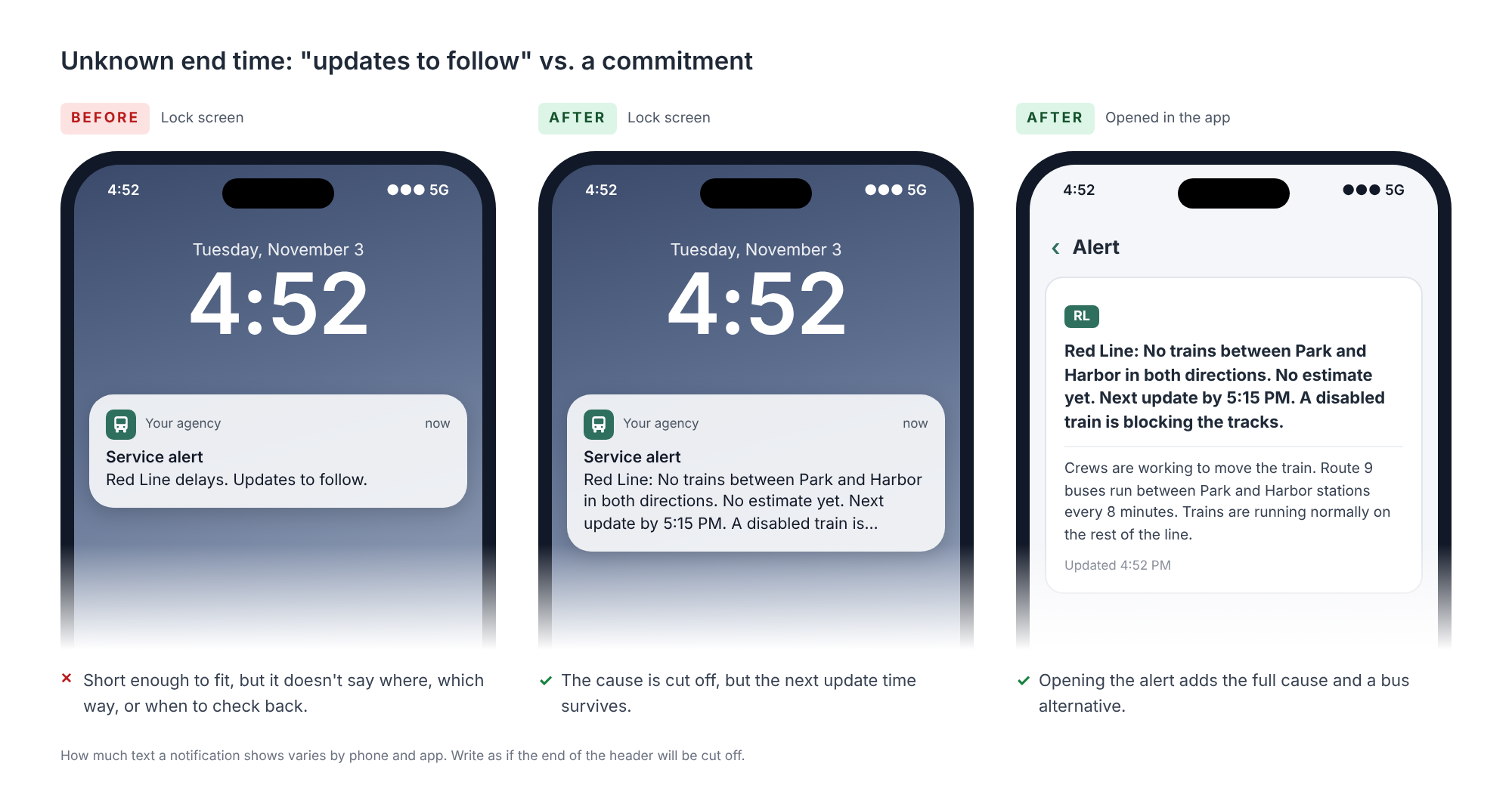
Red Line: No trains between Park and Harbor in both directions. No estimate yet, next update by 5:15 PM. A disabled train is blocking the tracks
Header: Blue Line, [Dates]: Shuttle buses replace trains between [Station A] and [Station B] due to [cause]. Description: Learn more: [Link]
Header: Blue Line, [Dates]: No trains between [Station A] and [Station B] due to [cause]. Shuttle buses run between [Station C] and [Station D] only. Description: [Alternative]. Learn more: [Link]
Header: Route 42, [Dates and hours]: Detoured off Main St due to [Event Name]. Board temporary stops on [Alternate St]. Description: Stops between [Location A] and [Location B] are not served. Learn more: [Link]
For planned disruptions, there is time to publish the change as structured data first, so trip planners such as the agency app, Google Maps, Apple Maps, and Transit can route riders around it automatically. I suggest doing that for every planned change, then leading the header with the dates and putting the diversion page link in the description, rather than fitting full schedules into the alert.
Timing, Updates, and Clearing the Board
Rider research shows that generic delay notices (for example, “Delays up to 25 minutes”) cause confusion. Riders can’t tell if they will wait an extra 25 minutes, if the bus will come later than its prediction, or whether it applies to their stop at all.
- Let feed settings control when an alert shows. Behind the scenes, an alert’s time settings determine when it appears and disappears in apps and on signs. The alert text should answer the rider’s questions, not repeat system logic.
- Use clock times, not durations. Write “Until about 6:00 PM” instead of “For 45 minutes.” A duration is wrong as soon as someone reads it late.
- Say when you don’t know. A missing end time leaves riders guessing. Use: “No estimate yet. Next update by 5:15 PM.”
- Describe the trip impact separately from the end time. If a shuttle adds time, say so directly: “Allow about 20 extra minutes between Central Station and North Terminal.”
- Update the original alert when estimates change. Don’t post a second alert. Update the details and timestamp on the original so riders see it is current.
- Skip “all clear” and residual delay alerts. Static recovery notices often contradict live predictions and create confusion.
- Remove the alert when service returns. As soon as service resumes, remove the alert quietly so live predictions take over without conflicting messages.
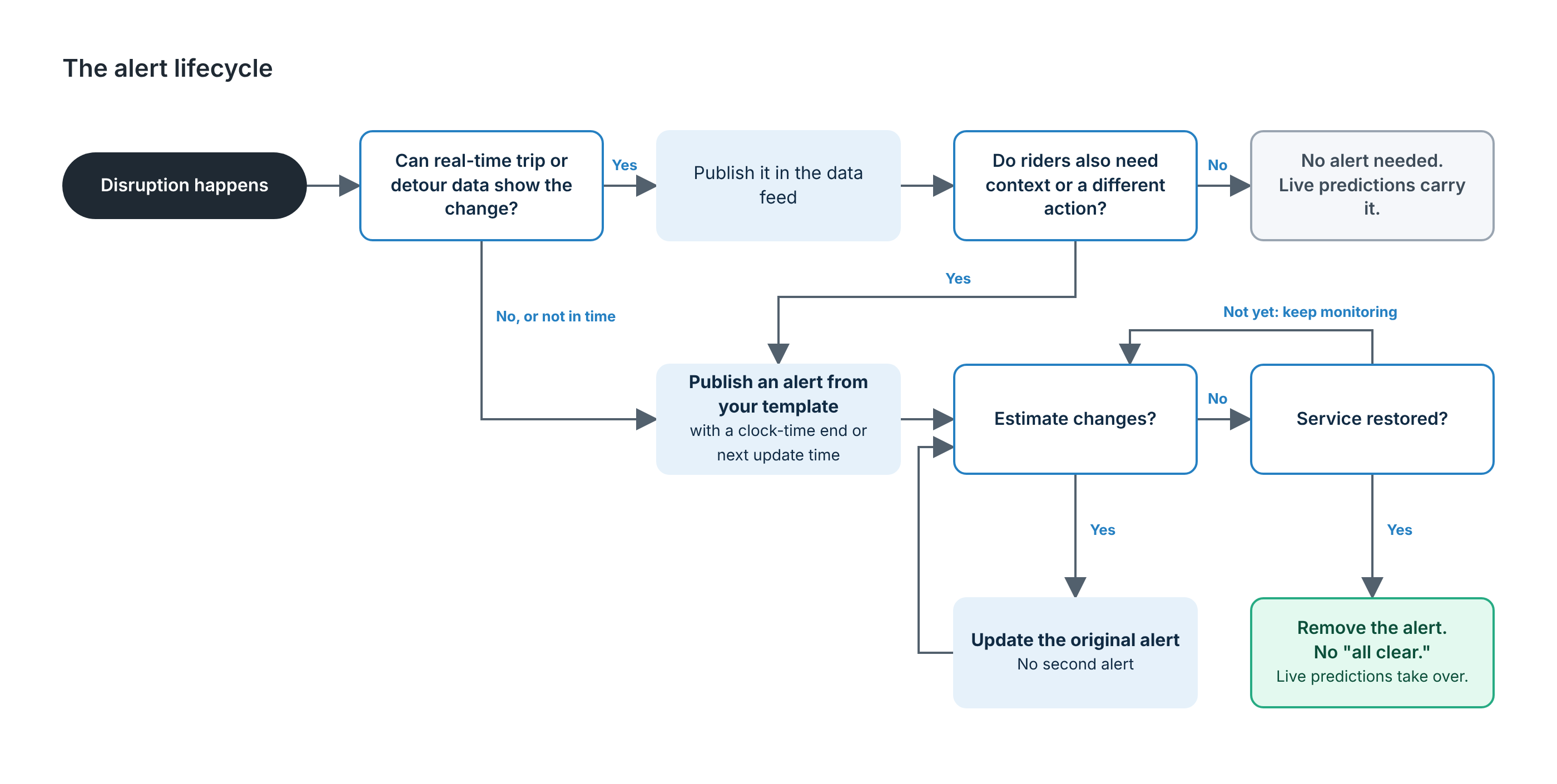
A quick decision-tree graphic for dispatchers and CX staff:
- Disruption happens → Check whether real-time trip or detour data can show the change.
- Data already shows the change and riders need no context? → No alert needed. Let live predictions carry it.
- Riders need context or a different action? → Publish an alert using your template, with a clock-time end or next update time.
- Estimate changes? → Update the original alert (no second alert).
- Service restored? → Remove the alert (no “all clear”) and let live predictions take over.
Examples: Before and After
The examples below are composites based on real alerts, with identifying details removed. They are not meant to single out any agency. Every agency publishing alerts is working on a hard problem, often with limited tools.
The Pre-Publication Checklist
Before publishing any alert, check:
☐ Read the header on its own. Assume it is the only text the rider will see, because on text messages and push notifications, it is. Do the first few words name the route and the effect?
☐ Is it specific? Does it name the direction, location, and time rather than a vague, route-wide notice?
☐ Does it describe the service riders will get? Avoid internal terms. Use the words in your style guide.
☐ Does it follow your template? Same building blocks, same order, same terms as every other alert of this type.
☐ Time check. Unplanned: Is the end time a clock time? If unknown, does it say when the next update is coming? Planned: Do the dates and hours lead the header, with a link to a diversion page in the description?
☐ Structured data check. Is the change also published as real-time trip, detour, or schedule data where your tools allow? For planned changes, was it published ahead of time so trip planners can route around it?
☐ Plain-language cause. Is the cause written in plain words (for example, staffing, traffic, maintenance, construction, an event)? Leaving out the cause can make riders feel they are being kept in the dark. If the cause is unknown, don’t guess.
☐ Alternatives and links, when they help. For major changes such as a rail suspension with shuttles or a multi-stop detour, is there a clear alternative or a link to a diversion page? Skip this for minor or single-trip changes where live predictions already show the next vehicle.
☐ Clutter control. Are longer causes, multiple alternatives, stop lists, and links in the description, so the header leads with what riders need most?
☐ Accessibility. Are accessible van instructions included whenever shuttle buses are in service?
☐ Lifecycle owner. Is someone assigned to update estimates and remove the alert as soon as service returns to normal?
Making This Work in Your Tools
The practices in this guide apply to any agency, but how far you can take them depends on your software. Whether you can set an effect, name affected stops, publish detours as structured data, and more all varies by vendor and setup. That is often where the biggest gap sits between what riders need and what an alert can deliver.
If you’d like help working out what your tools can support today, where the gaps are, or what to ask your vendor, I’m happy to talk it through. Book a time to talk.
Acknowledgments
Thank you to Cameron Monagle for reviewing this guide and for being a thoughtful partner throughout. Our conversations helped me see that what I’d learned about writing service alerts was worth codifying for other agencies, and his feedback made this guide sharper and more useful.